

osctrl-frontend
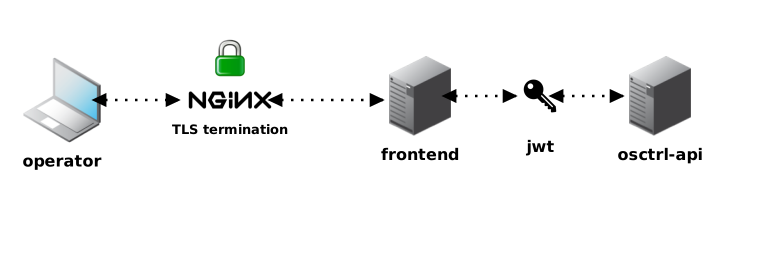
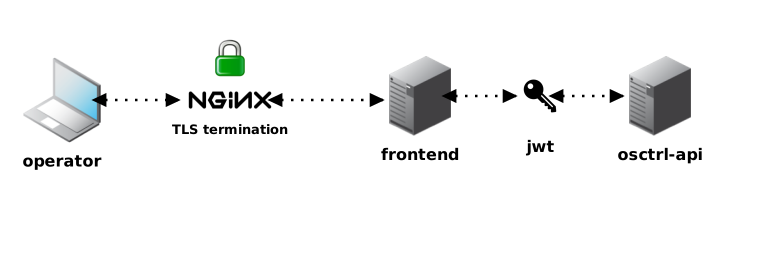
The osctrl-frontend component is the operator UI for osctrl. It provides the browser experience for managing environments, nodes, queries, saved queries, carves, tags, users, settings and posture data.
It replaces the old osctrl-admin interface. New operator-facing improvements are built here, as a React single-page application that talks to osctrl-api instead of rendering pages from a separate admin service.
In production, the frontend is built into static files and served by nginx or another static web server. API calls go to osctrl-api, usually through the same nginx entry point, so the browser can use same-origin cookies and keep the deployment simple.
Tech Stack
Section titled “Tech Stack”The frontend is built with:
- React 19 and TypeScript 7,
- Vite 8 for development and production builds,
- TanStack Router, Query and Table for routing, API state and data grids,
- Tailwind CSS 4 and Radix UI primitives for the interface,
- react-hook-form and zod for forms and validation,
- Monaco Editor for query editing,
- Vitest, Testing Library and Playwright for tests.
For local development, the Vite server runs from the frontend/ directory and proxies /api/* requests to osctrl-api. In the Docker development stack, nginx exposes the frontend at https://localhost:8444.
Live updates
Section titled “Live updates”When service.eventsEnabled is enabled on both osctrl-api and osctrl-tls, the frontend opens /api/v1/events streams for the views that benefit from quick refreshes: queries, carves, the node console, file explorer, alerts, service-command status, dashboard counters and node lists.
These events are lightweight invalidation hints. The frontend still uses REST for the real data and keeps polling fallbacks, so deployments can leave live updates off until Redis and proxy settings are ready for long-lived SSE connections.
Environment inactivity
Section titled “Environment inactivity”Each environment config page can override the inactive-node threshold used by node filters, health, dashboard counts and inactive-node alerts. The default is inherited from the global api/inactive_hours setting, and the Use global default action removes the environment override.
Node console
Section titled “Node console”Each node detail page can open a live interactive console that runs osquery against that single node in real time. It’s gated by the osquery.console configuration key on osctrl-api (and query: true) — disabled by default.
Besides pwd, cd <path>, ls [path], get <path> (carve a file), ps, sql <select ...>, osquery (switch to raw query mode), help and clear, the console supports these built-in commands:
| Command | Arguments | What it queries |
|---|---|---|
hash |
<path> |
File hashes (hash) |
mime / magic |
<path> |
File type (magic) |
curl |
<url> |
HTTP(S) request (curl) |
ports |
Listening ports | |
sockets |
Open sockets (process_open_sockets) |
|
lsof |
<pid> |
Open files for a process |
env |
<pid> |
Environment variables for a process |
routes |
Routing table | |
dns |
DNS resolvers | |
users |
Local users | |
loggedin |
Logged-in users | |
sudoers |
Sudoers | |
autoruns |
Autostart executables | |
cron |
Crontab entries | |
launchd |
launchd jobs (macOS) | |
services |
Services (Windows) | |
tasks |
Scheduled tasks (Windows) | |
certs |
Installed certificates | |
diskenc |
Disk encryption status | |
os |
OS version | |
sysinfo |
System info | |
uptime |
System uptime | |
packages |
Installed packages (platform-dependent) | |
extensions |
Browser extensions | |
firewall |
Firewall rules (platform-dependent) |
Type .tables/.exit inside osquery mode to list tables or return to the console.
File explorer
Section titled “File explorer”Each node detail page also offers a File Explorer tab: a tree view of that node’s filesystem, browsed live over osquery. It’s gated by the osquery.fileExplorer configuration key on osctrl-api (and query: true) — disabled by default.
Opening the tab creates a file explorer session for that node, rooted at the platform default (/ on Linux/macOS, C:\ on Windows), and closes it when you leave the page. Expanding a directory dispatches a hidden distributed query (select ... from file where directory = ...) and renders the results as child rows; selecting a file dispatches a stat-style query (select ... from file where path = ...) and shows its path, type, size, mode, uid/gid, and modified/accessed/changed times in the details pane.
From the details pane you can carve the selected file directly — it starts a regular carve for that path on the node and links to the resulting carve once it’s created.
The file explorer reuses the same session-priming and query-acceleration mechanism as the node console: opening the tab also dispatches a lightweight osquery_info query so live version/uptime metadata shows in the header, and its presence in the node’s queue can trigger accelerated polling when osquery.accelerated is enabled.
Alerts
Section titled “Alerts”The Alerts page (nav item hidden unless enabled) lets an operator define rules that watch osquery traffic and node liveness, and dispatch matches to notification channels. It’s gated end-to-end by service.alertsEnabled — disabled by default, and changing it requires restarting osctrl-api and osctrl-tls. See the Alerts CLI reference for the equivalent osctrl-cli alert commands.
A rule watches one source:
| Source | Fires on |
|---|---|
result_log |
Scheduled-query result rows matching the rule’s pattern |
status_log |
osquery daemon status messages, filtered by severity (error/warning/any) |
query_log |
On-demand distributed query results |
node_inactive |
A node crosses the environment’s inactive-hours threshold (periodic sweep, not log-driven) |
node_recovered |
A previously-inactive node is seen again (only evaluated when such a rule exists) |
For log-based sources, matchType is substring (case-insensitive) or regex, and an optional matchField narrows the match to one field instead of every column in the row. A rule can be scoped globally, to one environment, or pinned to a single node — the node detail page shows which rules currently cover it and why. Repeat matches are deduplicated by a per-rule cooldown (15 minutes by default).
Two channel types are available, each with its own dynamic config form and a “test” button to send a synthetic notification before saving:
- Webhook — HTTPS/HTTP POST of the alert as JSON, optionally HMAC-signed (
secret); refuses to target loopback/private/link-local addresses unlessallowPrivateTargetsis set, and retries transient failures with backoff. - Email — SMTP delivery (
host,port,username,password,from,to,starttls).
The Rules, Channels and History tabs cover rule/channel CRUD and a log of dispatched alerts; an Apply action hot-reloads the current rules/channels into osctrl-tls without a restart.
Log Sinks
Section titled “Log Sinks”The Log Sinks page manages where osquery logs (status, result, query, carve metadata/data) get exported, live — gated by service.logSinksEnabled (default true). It’s the operator-facing side of the same logger: YAML section documented in Configuration: that YAML only seeds this table on first boot, and from then on this page (or the /api/v1/log-sinks API) is the source of truth.
An operator can run multiple sinks at once, enable/disable each independently, scope them per environment, and route specific data categories to specific sinks — a form per sink type is generated dynamically from the sink type registry, so adding a new sink type needs no frontend changes. Each sink’s row shows a live byte/export counter. A sink edited here is marked as DB-sourced and stops picking up further YAML changes until it’s deleted or explicitly reverted; a clone action copies a working sink set from one environment to another; Apply hot-reloads osctrl-tls’s exporters in place — faster than the Service Config API’s restart-based apply, but it can drop logs that were mid-flight to a replaced exporter.
Auth Providers
Section titled “Auth Providers”The Auth Providers page — gated by service.authProvidersEnabled (default true) — lets an operator review, test, and edit the SAML and OIDC settings documented in Auth providers from the UI instead of only through YAML, including fetching an IdP’s SAML metadata by URL and reverting a provider back to its YAML-seeded values.
At v0.5.8 this is a management layer over the existing single-SAML/single-OIDC login model, not concurrent multi-provider login: the actual /api/v1/auth/{oidc,saml}/... login routes are still built once at startup from the classic saml.enabled/oidc.enabled YAML flags, the same as before this page existed. Treat it as a live editor and test bench for that one active SAML config and one active OIDC config, not as a way to run several independent SAML/OIDC providers side by side yet.