

osctrl-mcp
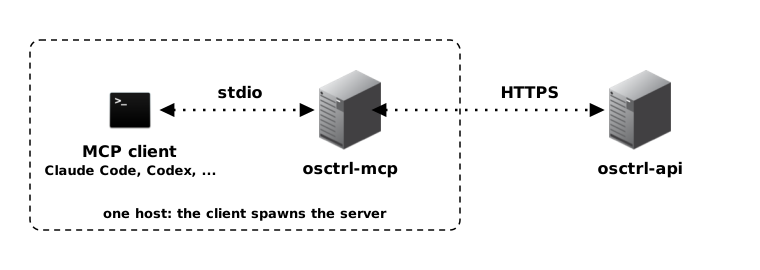
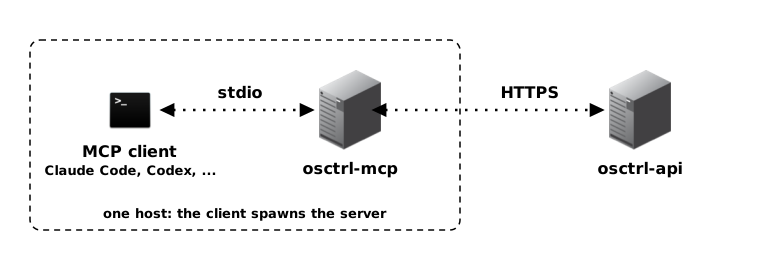
The osctrl-mcp component is the Model Context Protocol bridge for osctrl. It gives MCP-capable assistants and automation tools a safer, structured way to work with osctrl data through osctrl-api instead of connecting directly to the backend database.
Use it when you want an assistant to help with operator workflows: finding nodes, inspecting environment state, checking posture signals, preparing queries, or summarizing what is happening across the fleet. The component should be treated like any other privileged integration: give it narrowly scoped credentials, and register it only with MCP clients you trust.
Current osctrl supports MCP in two shapes: a stdio osctrl-mcp binary launched by a local MCP client, and an optional /api/v1/mcp endpoint hosted by osctrl-api when mcp.enabled is true.
How It Fits
Section titled “How It Fits”osctrl-mcp sits beside the human and script-facing interfaces:
- osctrl-frontend is for browser operators,
- osctrl-cli is for shell automation,
osctrl-mcpis for MCP clients that need typed tools and context.
All three should go through osctrl-api for platform actions. That keeps authentication, authorization, audit logging, rate limiting and API validation in one place.
Deployment Notes
Section titled “Deployment Notes”The stdio osctrl-mcp binary is not a daemon. It is launched by the MCP client itself, so there is no listener to expose, no port to publish and no state to persist. It needs only network access to the osctrl-api endpoint, and no direct access to PostgreSQL.
The hosted /api/v1/mcp endpoint is part of osctrl-api and uses the caller’s normal token, permissions and audit log. Both modes are read-only unless writes are explicitly enabled. Create a dedicated osctrl service account for MCP usage, scope it to what the agent should read, keep its token out of the frontend, and rotate it like any other integration secret.
See the usage of osctrl-mcp for the flags, the tool list and client registration examples.